Librenms 串接 Windows AD 驗證
BUBU 因專案上有遇到需要透過 Windows AD 來做帳號驗證,因此本篇記錄該怎麼做設定。
運行環境
環境都是在 「Proxmox VE 」 虛擬系統上架設,都是以 「 LXC 」模式為主,除非有特殊狀況會告知使用 「 VM 」 模式
- 系統環境: Debian 12
設定過程
官方文件有提到在做帳號驗證登入只能選擇單一方式做登入,目前還尚未支援多來源驗證登入,系統預設驗證方式是用資料方式。
- 串 Windows AD 設定檔
vim /opt/librenms/config.php
### Authentication Model
# 驗證來源啟用模式
$config['auth_mechanism'] = "active_directory";

#Active Directory Authentication
# AD LDAP 連線位置
$config['auth_ad_url']          = "ldap://dc1.abc.local";
# AD 網域名稱
$config['auth_ad_domain']       = "abc.local";
# LDAP Base DN
$config['auth_ad_base_dn']      = "dc=abc,dc=local";
# LDAP 憑證驗證
$config['auth_ad_check_certificates'] = true;
# Bind 帳號(帳號名稱)
$config['auth_ad_binduser'] = 'administrator';
# Bind DN(完整 Distinguished Name)
$config['auth_ad_binddn'] = 'cn=administrator,cn=users,dc=abc,dc=local';
# Bind 帳號密碼
#$config['auth_ad_bindpassword'] = 'password';
# AD 驗證除錯模式
$config['auth_ad_debug']        = false;
# 使用者清除機制(天)
$config['active_directory']['users_purge'] = 30;
# 強制群組成員限制
$config['auth_ad_require_groupmembership'] = true;
# AD 群組:LibreNMS_Admins(系統管理者)
$config['auth_ad_groups']['LibreNMS_Admins']['level'] = 10;
# AD 群組:LibreNMS_Users(Global Read)
$config['auth_ad_groups']['LibreNMS_Read']['level'] = 5;
# AD 群組:LibreNMS_Users(User)
$config['auth_ad_groups']['LibreNMS_Users']['level'] = 1;
# 使用者 LDAP 過濾條件
#$config['auth_ad_user_filter'] = "(&(objectclass=user)(sAMAccountName=$username))";
# 群組 LDAP 過濾條件
#$config['auth_ad_group_filter'] = "(&(objectclass=group)(sAMAccountName=$group))";
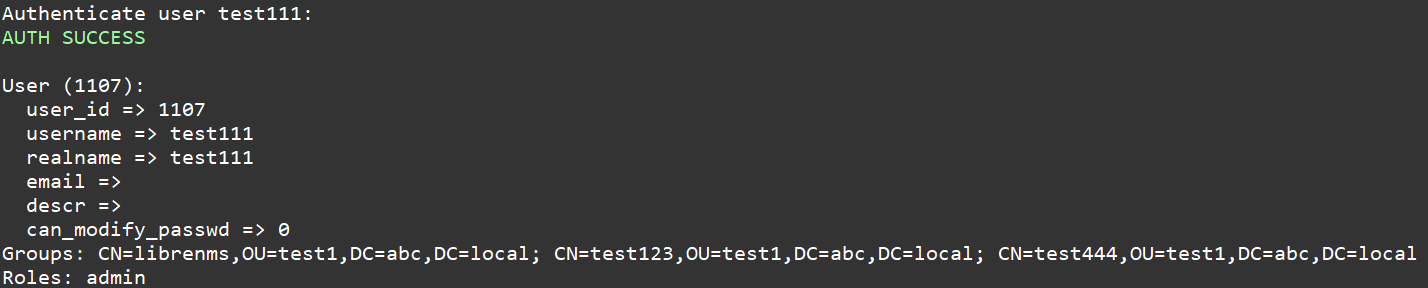
- 驗證
php /opt/librenms/scripts/auth_test.php -u 使用者

- 驗證沒問題系統會帶出該使用者相關資訊